Business automation & AI systems
Less chasing.
Better handovers.
More room to grow.
Business process automation connects repeatable work. Workflow automation links your tools to route enquiries, follow up leads and prepare reports—with your team in control where judgement matters.
Other business types
Step 1 of 5
A good enquiry reaches the right person.
A prospective client asks for help with reporting across three offices.
How it works · who decides
The system helps
Keep the request together, record where it came from and assign an owner.
Your team decides
Check whether the work is a good fit and decide who should respond.
Worth measuringUnassigned enquiries · time to a useful reply
An example to explore, not a live client record. Nothing is sent or changed.
AI services and wider growth support
How the systems
fit together.
This hub brings Ampliflow’s AI services into one place, alongside related growth websites and business dashboards. Start with the business need you want to address; not every company needs every system below.
Be found
Make your offer easier to find and understand.
Respond
Support calls and bookings, with a clear handover to a person.
Equip your team
Connect repeat steps and make company knowledge easier to find, with sources attached.
Make informed decisions
Bring pipeline, revenue, marketing and operations into one clear view.
Hypothetical workspace
Find the work
already within reach.
Invented sample data and fixed rules. No live AI, no sending, no real financial figures.
Explore a fictional consultancy across three offices. Change a source record, inspect the finding, then prepare the team’s weekly action brief.
- 01 · Inspect the sources
- 02 · Check the findings
- 03 · Prepare the actions
8 unique records · 4 follow-ups · 2 checks · 2 with no action suggested. Counts describe demo findings, not sales or revenue.
Follow up
Example client A
Follow up
Pending proposal open 12 days (>= 7); follow up with the customer.
Birmingham · Account lead · proposal
Relative to this fictional snapshot. Edit the number to test the rule; it is not a live date.
Proposal for a second-office reporting service. The existing project is tracked in rec-1004. No decision recorded.
rec-1001
Weekly brief
Replacing the brief removes your edits. Download first to keep them. Resetting the sample records preserves this text and marks it out of date. Nothing is saved after leaving or reloading this page.
What would AI add in a real system?
AI could help interpret authorised notes and prepare drafts grounded in source records. This demonstration uses fixed rules instead. A real implementation needs permissions, source validation, human approval and testing with your team. No result here is a promise of customer growth.
Start where the work gets stuck
A clearer path through
the whole business.
You do not need to automate everything. Choose the handover that costs your team the most attention.
Win the right work
Give enquiries an owner, keep proposals moving and make the next action clear.
Keep delivery moving
Bring requests and missing information to the right person, with the context they need.
See what needs attention
Bring the daily picture together and flag gaps before somebody relies on the wrong number.
Built by Ampliflow
One enquiry.
A connected product.
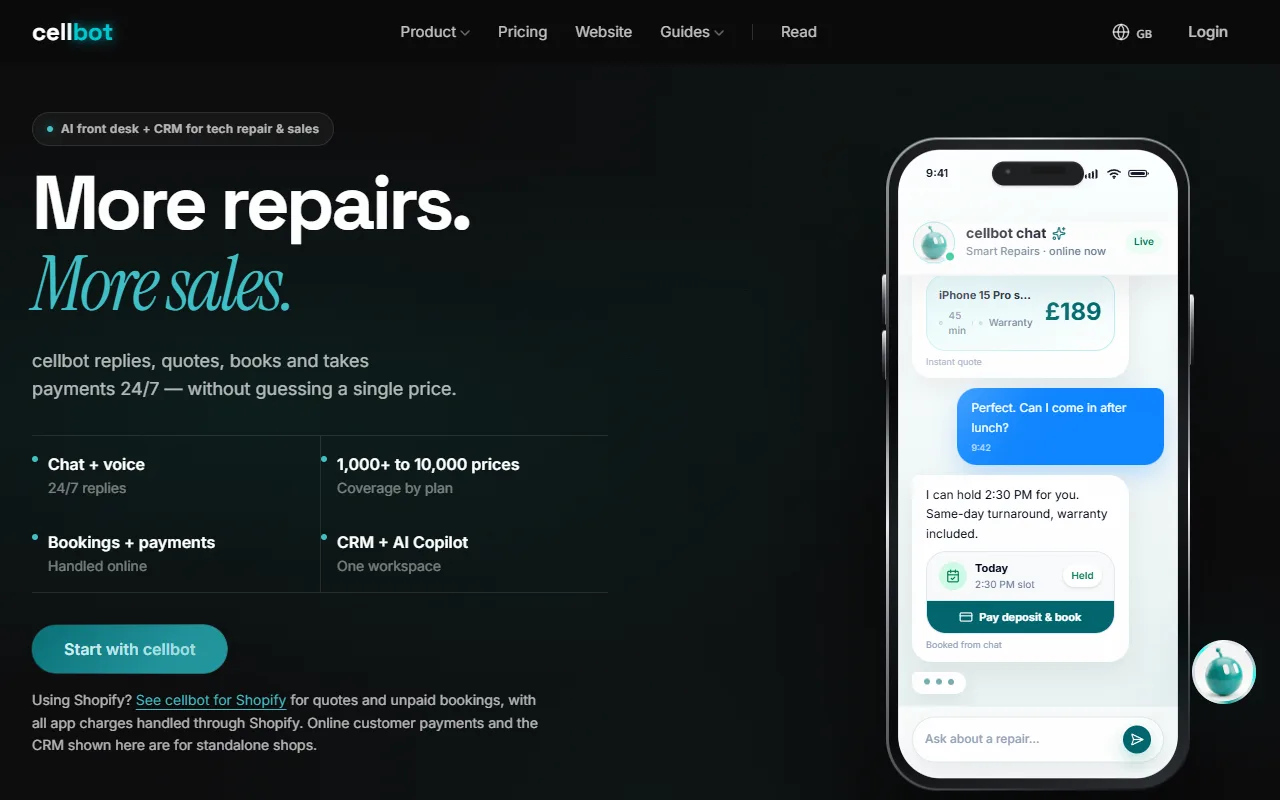
Cellbot brings repair enquiries, pricebook-led quotations, booking and customer tracking into one product.
- Repair request
- Pricebook-led quote
- Booking
- Customer tracking
The important detail: a quotation needs the device, repair and shop’s price to agree. Connecting steps is useful only when the information is right.
See the build and its boundariesBased on our published Cellbot case study. The image shows its public website, not the working application. Product delivery evidence; no measured customer-growth claim.
Make the first step useful
One real problem.
Something you can check.
Bring the messy version: the spreadsheet, the repeated question, the handover that keeps slipping. That is a useful place to start.
- 01
Follow the work
Where does it start? Who takes over? What gets copied, chased or lost?
- 02
Test the awkward bits
Missing details. A changed request. Someone away. Check these alongside the happy path.
- 03
Check what improved
Compare the time, outstanding work and mistakes against the starting point.
Sometimes your existing software already has the answer. It is worth checking before building something new.
The people behind the work
Sajad & Hassan.
Thinking and building together.
Ampliflow is a father-and-son studio. You work with the people shaping and building the system, with a direct route from your feedback to the work.
Meet the foundersThe automation library
Small changes.
Useful every day.
Start with a task you recognise. See the steps, the checks and what is worth measuring.
01EnquiriesGive every enquiry an owner
Keep a new enquiry moving, even when the person who first sees it is busy.
- 01
An enquiry arrives through an agreed channel.
- 02
The details are recorded and assigned to the right person.
- 03
A reply is drafted and an unanswered enquiry becomes a follow-up task.
- What you need
- A shared inbox or enquiry form, a customer record and an agreed person responsible for each type of request.
- What stays with you
- Your team approves prices, availability and commitments before a reply goes out.
- If something goes wrong
- Missing details or an uncertain match go to a review queue. An unassigned enquiry alerts the fallback owner.
- What to measure
- Time to a useful reply, unassigned enquiries and completed follow-ups.
- Where AI helps
- AI can organise a free-text enquiry and draft a reply. Assignment and reminders can follow fixed rules.
- Check your existing software
- Check the assignment and reminder features in your current customer-management software first.
02EnquiriesFollow up a missed call
Turn a missed call into a visible next step for your team.
- 01
Your supported phone system records a missed call.
- 02
A callback task is created, with an approved acknowledgement where appropriate.
- 03
A person follows up and records the outcome.
- What you need
- A phone system that exposes missed-call events, contact rules and someone responsible for callbacks.
- What stays with you
- You set contact hours, message wording and which calls should receive a response.
- If something goes wrong
- Withheld numbers and repeated calls are flagged instead of triggering repeated messages.
- What to measure
- Callbacks completed, time to callback and enquiries recovered.
- Where AI helps
- A missed-call task normally needs rules, not AI. AI call handling is a separate decision.
- Check your existing software
- Check your phone system's missed-call notifications before adding another connection.
03CustomersRemind customers about bookings
Help booked customers remember their visit and tell you when plans change.
- 01
A booking is confirmed in your booking system.
- 02
Its current status is checked before a reminder is due.
- 03
The customer receives the agreed details and a way to change or cancel.
- What you need
- A booking system, correct contact details and agreed reminder and cancellation rules.
- What stays with you
- You decide the timing and wording. Special requests go to a person.
- If something goes wrong
- Cancelled or changed bookings suppress the old reminder. Failed delivery is made visible to the team.
- What to measure
- No-shows, cancellations received in time and reminder delivery failures.
- Where AI helps
- Ordinary reminders use dates and rules. AI is not needed to remember a booking.
- Check your existing software
- Look for reminders in the booking software you already pay for. Check plan and messaging costs.
04EnquiriesFollow up an unanswered quote
See which quotations still need a conversation, without searching through your sent emails.
- 01
A quotation is sent and its status recorded.
- 02
After your agreed interval, the status is checked again.
- 03
An unanswered quote creates a follow-up task or a draft message.
- What you need
- A reliable quote record, agreed follow-up intervals and a named owner.
- What stays with you
- A person handles objections, changes to the scope and any discount or price decision.
- If something goes wrong
- Accepted, declined and disputed quotes stop the reminder sequence. Missing status goes to review.
- What to measure
- Quotes followed up, response rate and accepted quotations.
- Where AI helps
- AI can draft a contextual message; it should not invent a new offer or concession.
- Check your existing software
- Check quote reminders and tasks in your current sales software.
05OperationsChase overdue invoices
Prepare the right reminder after checking whether the invoice still needs paying.
- 01
An invoice passes its agreed due date.
- 02
Payment and dispute records are checked.
- 03
An eligible invoice receives the approved reminder or becomes a review task.
- What you need
- Accurate invoice and payment records, agreed payment terms and a way to record disputes.
- What stays with you
- Your team handles disputes, payment plans and changes to terms. The workflow does not move money.
- If something goes wrong
- Pause reminders when payment data is unavailable or a dispute is open. Ask a person to check.
- What to measure
- Overdue invoices, manual chasing time and incorrect reminders.
- Where AI helps
- Dates and balances can use fixed rules. AI may help draft a reply for review.
- Check your existing software
- Xero already offers invoice reminders. Check your accounting software before commissioning a custom workflow.
06OperationsKnow when stock is running low
Get a useful warning while there is still time to check and reorder.
- 01
Recorded stock falls below a threshold you choose.
- 02
The item and location are checked against the latest stock record.
- 03
The person responsible receives an alert and decides what to order.
- What you need
- Accurate stock records, agreed thresholds and someone responsible for ordering.
- What stays with you
- A person checks pack sizes, supplier lead times and budget before any purchase.
- If something goes wrong
- Stale or unavailable stock data creates a check request, not an automatic order.
- What to measure
- Stockouts, useful alerts and time spent checking stock.
- Where AI helps
- A threshold alert uses rules. Forecasting demand is a different, more data-dependent task.
- Check your existing software
- Square supports low-stock alerts. Check your till or inventory software first.
07OperationsSee the day in one summary
Bring agreed sales, enquiries and open tasks into a short report with links to the source.
- 01
The agreed reporting period closes.
- 02
Available records are collected and totals checked.
- 03
The owner receives a summary of activity and items needing attention.
- What you need
- Reliable source records, agreed definitions and access to the relevant reports.
- What stays with you
- You choose what matters and check the source before making a commercial decision.
- If something goes wrong
- Missing data is labelled unavailable, not counted as zero. Failed collection alerts the report owner.
- What to measure
- Report preparation time, missing-data incidents and actions completed.
- Where AI helps
- AI can summarise verified figures. Calculations should use the underlying records, not generated guesses.
- Check your existing software
- Try your current software's scheduled reports before combining multiple systems.
08EnquiriesSort customer messages
Separate orders, questions and complaints so the right person can respond.
- 01
A message arrives in the shared inbox.
- 02
Its topic is suggested and the original message retained.
- 03
It goes to the appropriate queue, with uncertain messages marked for review.
- What you need
- A shared inbox, clear categories and an owner for unclassified messages.
- What stays with you
- People can correct categories. Complaints and sensitive requests have a human review path.
- If something goes wrong
- An uncertain classification stays visible in the review queue; it is not silently archived.
- What to measure
- Routing accuracy, oldest unanswered message and time spent sorting.
- Where AI helps
- AI can interpret varied wording; simple sender and subject rules may already cover much of the work.
- Check your existing software
- Check shared-inbox labels, rules and assignment features first.
09CustomersDraft answers to repeat questions
Use approved business information to prepare an answer your team can check.
- 01
A customer asks a familiar question.
- 02
The relevant approved information is located.
- 03
A draft answer and its source are shown to the person replying.
- What you need
- Current approved answers, a source owner and clear limits on what may be answered.
- What stays with you
- Your team checks the draft. Prices, stock and policies need current authoritative information.
- If something goes wrong
- If the source is missing or contradictory, ask a person. Do not fill the gap with an invented answer.
- What to measure
- Draft accuracy, corrections and handling time.
- Where AI helps
- AI can find and draft from approved information, with sources attached and human review.
- Check your existing software
- Saved replies may be enough if you answer only a few repeated questions.
10CustomersTell customers an order is ready
Keep collection messages tied to the real order status.
- 01
Your team marks an order ready for collection.
- 02
The customer and order reference are checked.
- 03
The approved collection message is prepared or sent through the agreed channel.
- What you need
- A reliable ready-for-collection status, correct customer details and collection instructions.
- What stays with you
- The team confirms the order is actually ready and handles substitutions or changes.
- If something goes wrong
- Missing contact details create a staff task. Duplicate status updates must not send duplicate messages.
- What to measure
- Uncollected orders, status enquiries and failed notifications.
- Where AI helps
- This is normally a status-and-rules workflow; AI is not required.
- Check your existing software
- Check collection notifications in your existing ordering platform.
11CustomersAsk for feedback after the job
Give genuine customers a consistent way to tell you how things went.
- 01
A completed job or purchase is confirmed.
- 02
The customer is checked against your contact and suppression rules.
- 03
A feedback request is prepared and responses reach the right person.
- What you need
- A verified completion record, appropriate contact permissions and a feedback destination.
- What stays with you
- Your team reviews wording and responds to concerns. Do not filter public-review invitations by sentiment.
- If something goes wrong
- Cancelled jobs and customers who should not be contacted are excluded. Complaints go to a person.
- What to measure
- Feedback responses, issues resolved and requests sent in error.
- Where AI helps
- AI may summarise responses for review; sending a request can follow fixed rules.
- Check your existing software
- Your booking or customer-management software may already support feedback requests.
12CustomersReconnect with past customers
Find appropriate opportunities to start a useful conversation again.
- 01
A suitable past-customer group is identified.
- 02
Contact permissions, recent activity and exclusions are checked.
- 03
A reviewed campaign is prepared and responses are assigned to a person.
- What you need
- Accurate customer records, valid contact permissions and an approved reason to get in touch.
- What stays with you
- You approve the audience and message. No discounts or offers are invented.
- If something goes wrong
- Uncertain permissions or incomplete suppression data stop the campaign for review.
- What to measure
- Qualified replies and repeat orders, compared with customers who did not receive the campaign where practical.
- Where AI helps
- AI can help draft messages for review. Clear rules should decide who gets them—and who does not.
- Check your existing software
- Check segmentation and scheduled campaigns in your current email platform.
These are illustrative workflows, not a list of pre-built integrations. We check your software, the rules and the exceptions before agreeing a scope.
Where AI belongs
Rules for the routine.
AI for the messy bits.
A booking reminder follows a date. An invoice reminder checks a balance. Neither needs AI. Reading a varied customer message or drafting from approved information may benefit from it.
Choose a useful first workflowA fixed rule
If the next step is predictable, keep it predictable. Dates, assignments and reminders can follow agreed rules.
Help with interpretation
AI can help organise varied messages or prepare a draft from approved information.
A person's judgement
Your team approves commitments, resolves uncertainty and handles decisions that need care.
Before you start
A few useful questions.
What should we automate first?
The best first workflow is usually repetitive, frustrating and easy to describe: lead routing, report building, invoice handling, inbox triage, CRM updates or customer onboarding. We start there before building anything bigger.
Will this work with our current software?
Usually, yes. If your tools have an API, webhook, export, shared inbox or database access, we can normally connect them. If the software is awkward, we will say that during scoping instead of hiding it inside the build.
Can AI make decisions in the workflow?
Yes, but we are careful about where AI belongs. It is useful for classifying, summarising, drafting and routing. Human approval stays in place for sensitive decisions, money movement, legal risk or anything that needs judgement.
How do we know the automation is reliable?
We build around real examples, test exceptions, add logging and define what happens when something fails. A good automation should either complete the work or alert the right person with enough context to act.
Do we own the automation?
That depends on the systems involved and what is agreed for the project. Before work begins, ask who controls the accounts, what your team can change and what the handover covers.
One useful starting point
Where does the work
get stuck?
You do not need a technical brief. Tell us what keeps getting chased, copied or lost, and we can work through the sensible next step together.
What should I bring to a clarity chat?
One example of the problem, the tools involved and who currently handles it. Tool names and a description are enough to start; keep customer details and access credentials private.
Useful questions to work through: can your existing software handle it, what needs a human check, and what would show that the change helped? Scope, access and commercial terms need agreement before a build.