The website is becoming a product
Customers need accounts, personalised journeys, live data, useful tools or a portal—not another brochure page.
Next.js development agency · UK
Fast marketing sites, customer portals and connected web products—designed around the job, not squeezed into a theme.
A distinctive website your team can run.
Custom interface
No theme-shaped compromise
Search foundations
Visible, crawlable and structured
Production performance
Measured with real pages
Controlled handover
Routine content stays editable
Next.js earns its place when the website needs this level of control. If it does not, we will say so.
A Next.js website is built with a framework based on React, a library for creating interfaces. Next.js adds the tools for serving pages and connecting them to data. It can support a public website, an account area or a web application. It is not a ready-made theme or an editing system.
For a business, the useful question is what the website needs to do. A simple publishing site may need less engineering. A site with custom journeys, live information or connected systems needs a clearer development brief. Our Next.js versus WordPress guide helps you make that choice.
Technical reference: the official Next.js documentation. A framework gives you tools; it does not establish how well an individual website has been built.
The fit test
The framework is a means, not the pitch. These are the signals that a custom build may be commercially sensible.
Customers need accounts, personalised journeys, live data, useful tools or a portal—not another brochure page.
The team keeps working around rigid layouts, slow pages or integrations that no longer fit the way the business operates.
Important URLs, content, internal links and measurement need a controlled migration rather than a launch-day redirect scramble.
The production site needs measured budgets, restrained third-party code and a clear owner—not a perfect score on an empty demo.
What we build
Distinctive, fast websites with clear service journeys, proof, editable content and search foundations built in.
Useful private or public journeys that bring content, accounts, directories, forms and business data into one interface.
Customer-facing tools and internal workflows that need to behave like software while remaining easy to understand.
A controlled move from WordPress or another platform, with page parity, redirect mapping, crawl checks and post-launch monitoring.
Proof in production
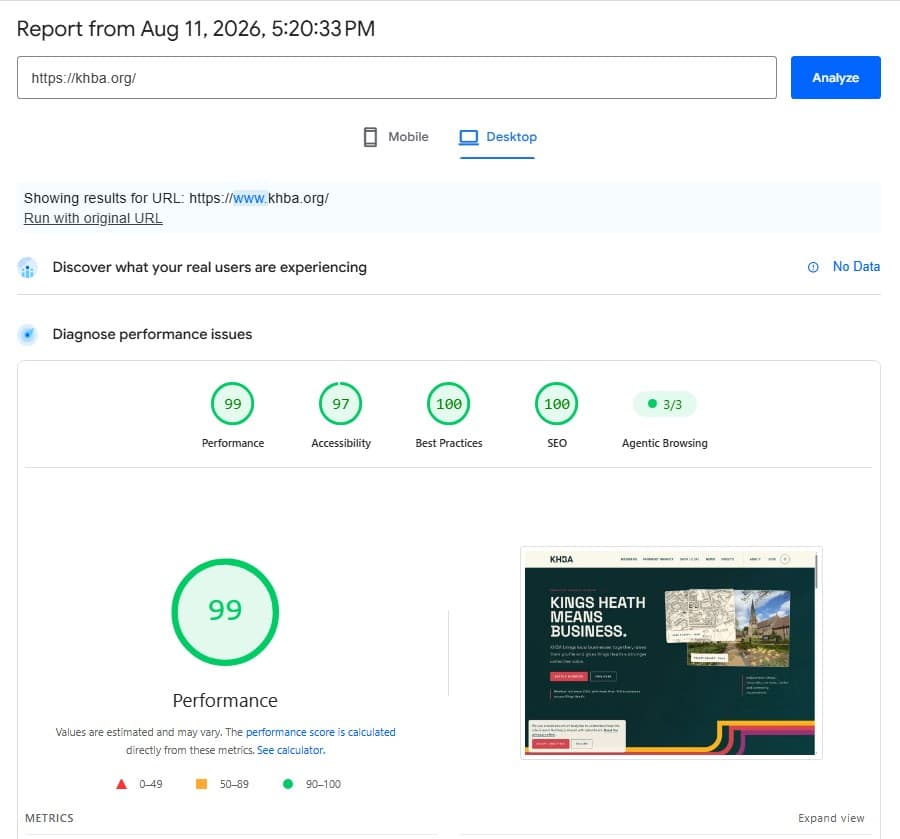
Ampliflow built the Kings Heath Business Association website with Next.js and Sanity, so its team can update most routine content without changing the public design. A PageSpeed Insights lab run of the homepage on 11 August 2026 recorded performance scores of 93 on mobile and 99 on desktop.
These are dated lab measurements, not a promise that every run or every website will score the same.
See the full case study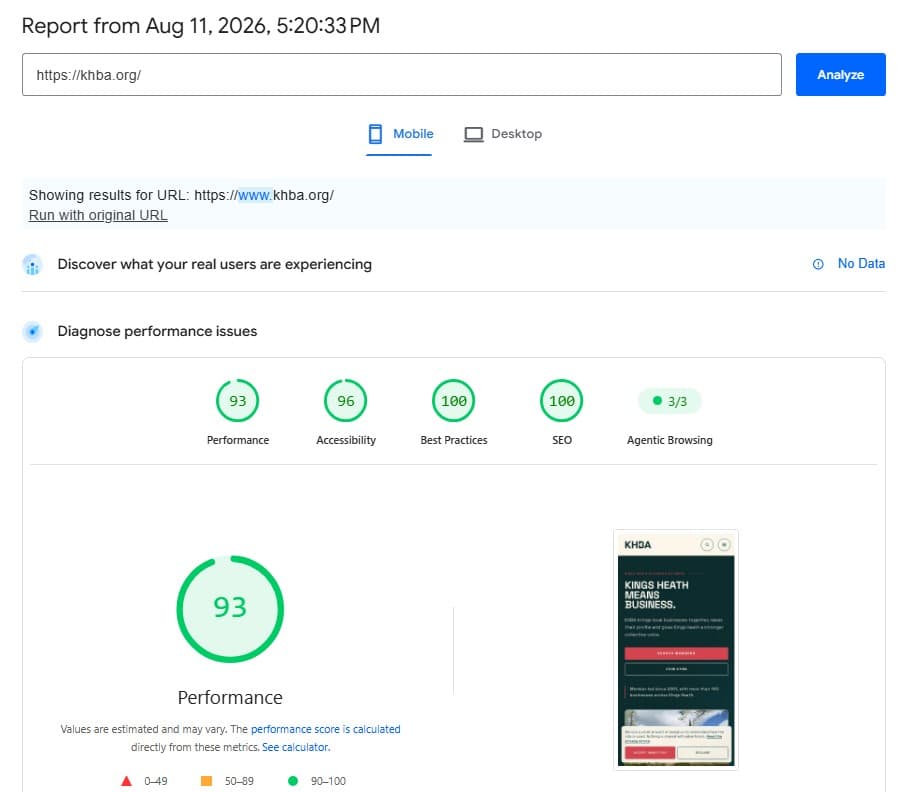
How we work
Plan your Next.js project
Before comparing Next.js development proposals, write down these six decisions. The same brief lets you compare what each agency has understood, what it will test and what remains outside the agreed scope.
Name the person using the website, what they need to do and what currently gets in their way.
Describe one journey from arrival to completion: finding a service, sending an enquiry or using an account. Include what happens when something fails.
List what your team needs to edit, where information comes from and which other systems the website must work with.
Record important pages, search traffic, forms and content before a rebuild. Identify who will check them against the existing site.
Agree how you will check the real pages, editing tasks and customer journeys on mobile and desktop. Record the result, date and reviewer.
Name who controls the domain, source code, hosting and content, and who handles updates or failures. Ask what is included and what needs a separate agreement.
See what you can check. Our Kings Heath Business Association project shows the delivered website and dated performance evidence. Use the agency evidence walkthrough to separate what a public example proves from what you still need to ask.
Download the Next.js project brief (Markdown). No email required. It is an original Ampliflow planning template with blank answers, not a quote, agreed scope or completed assessment.
For technical acceptance, use our Next.js SEO checklist alongside the official production checklist. Search visibility, performance and a working customer journey each need their own evidence.
Next.js decision library
Practical guides for the decisions that carry most of the risk.
Follow a published change through a tested cache experiment and an editorial handover.
02Understand loading states, Instant Navigations and the limits of a controlled streaming test.
03Review tenant isolation, hosting, migration, monitoring and recovery with an evidence worksheet.
04For business owners: define the users, workflow, permissions and first useful version.
05For technical teams: trace data, access, caching and failure handling with a reusable review matrix.
06Compare build scope, migration, running costs and ownership with a reusable worksheet.
07A practical scorecard for proof, architecture, migration, ownership and aftercare.
08Choose the simpler fit for your content, team, integrations and growth plans.
09Protect URLs, search signals, analytics and editorial workflows before cutover.
010The App Router production gate for rendered content, metadata and discovery.
011A field-first method for finding the page, template and code that need attention.
Common questions
The scope of the design, editing system, customer journeys, integrations and migration determines the work involved. Compare the initial build, separately charged launch work and ongoing costs over the same period. Ask what is included, excluded and still unresolved before comparing headline prices.
Next.js is a strong fit when the website needs custom journeys, live data, integrations, portal features or tighter control over rendering and performance. A straightforward publishing site may be better served by a simpler platform.
Not by default. WordPress is familiar, flexible and well suited to many editor-led websites. Next.js becomes valuable when custom product behaviour, integration depth, interface control or a separated content system justifies the extra engineering.
A careful migration can protect important search signals, but no responsible agency should promise unchanged rankings. The work includes a complete URL inventory, page parity, one-to-one redirects, rendered metadata, internal-link updates, crawl testing, sitemaps and Search Console monitoring.
Yes. The editing experience comes from the content system connected to the website. The right setup lets a team update routine content without giving every page unrestricted layout controls.
No. Next.js provides strong production tools, but performance still depends on architecture, images, fonts, scripts, data loading, caching and the content added after launch. Field data and production testing matter more than the framework label.
Have a website, migration or product in mind?
We will tell you whether Next.js is the right tool—and what the first sensible step looks like.
Building for a US business? See our US Next.js development company page.