AI Voice Agents for Mobile Phone Repair Shops: A Practical Guide
AI voice agents for phone repair shops: plan bookings, pricing enquiries and authorised repair status calls, with setup, handover and cost checks.
- 01The Phone Repair Shop Paradox
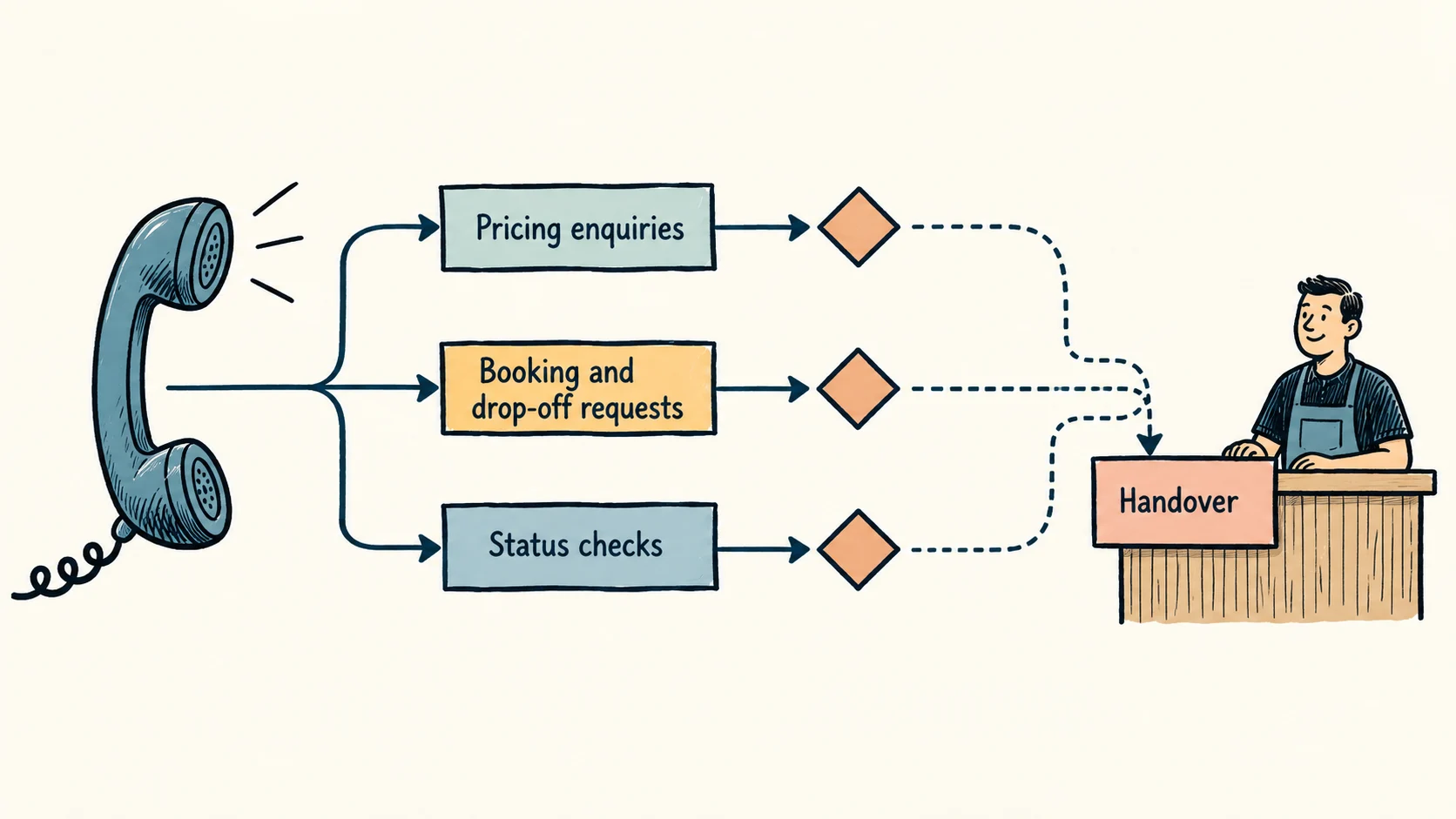
- 02Three Call Types to Review First
- 03How AI Voice Agents Work in a Repair Shop
- 04Integration with Repair Management Systems
- 05What the AI Cannot Handle (And What to Do About It)
An AI voice agent can help a phone repair shop answer routine questions and capture enquiries while technicians work. It should use the shop's approved prices, intake process and repair records, with a clear handover for diagnosis, complaints and anything uncertain.
The aim is a customer who knows the next step and a technician who receives the right details. A convincing voice alone does not achieve that.
The Phone Repair Shop Paradox
Repairs need concentration. Calls need attention. When both arrive together, something waits.
Before buying an answering system, review which calls interrupt work and what happens afterwards. Some are new enquiries; others are customers checking a job already underway. A better status message or callback process may solve part of the problem without voice AI.
Three Call Types to Review First
- 01Pricing Enquiries
- 02Booking and Drop-Off Requests
- 03Status Checks
1. Pricing Enquiries
Customers may not know the exact model or fault. The agent needs approved questions and a way to distinguish a published price from a quote that requires inspection. It must not promise a part grade, warranty or turnaround that the shop has not confirmed.
2. Booking and Drop-Off Requests
Use the business's actual intake model: appointments, walk-ins, mail-in repairs or a combination. A captured enquiry is not a confirmed booking. Check capacity, parts requirements and the correct address before giving instructions.
3. Status Checks
Status calls need an authorised, current repair record. Verify the caller appropriately before revealing customer or job information. A name or a phone number alone may not be sufficient, particularly where devices contain sensitive information.
How AI Voice Agents Work in a Repair Shop
The following are illustrative call flows, not reported client results.
Scenario 1: Pricing Call
A caller asks about a cracked screen. The assistant identifies the device and checks the approved service information. If a price cannot be confirmed, it explains that the team needs to assess the repair and captures a callback request. It does not turn an indicative price into a binding promise.
Scenario 2: Status Check
A caller asks whether a device is ready. After the agreed identity check, the system retrieves the permitted status. If the record is missing or ambiguous, it asks the team to respond rather than guessing a completion time.
Scenario 3: After-Hours Emergency
A caller describes a damaged device outside opening hours. The assistant can record the problem and provide approved safety and intake information. It must not improvise advice about hazardous batteries, guarantee data recovery or promise an emergency repair service that does not exist.
Integration with Repair Management Systems
What the AI Connects To
Potential connections include a service knowledge base, booking calendar and repair-management record. Compatibility, permissions and data quality need checking for the specific system. “Integration available” does not mean every function is included or safe to expose.
Company Cortex is relevant where staff need a maintained source of approved business knowledge. Our knowledge-base guide explains how to prepare answers and exceptions.
Data Flow Example
The caller asks a question → the assistant identifies the permitted task → any required identity check happens → the connected system returns a result → the assistant communicates only that result → the team receives a record or escalation.
If a connection fails, the flow should stop the action and create a follow-up request. Never confirm a booking or change a repair status without a successful response from the underlying system.
How AI Voice Agents Can Support Phone Repair Revenue
Current State (No AI Voice Agent)
Count unique new enquiries, missed calls recovered by staff, bookings, completed repairs and refunds. Separate status calls from sales enquiries and note your busy periods.
With AI Voice Agent
Measure whether more eligible enquiries reach completed work, and whether staff spend less time repeating information. Deduct usage, setup, maintenance and correction costs. Use the money left after parts and other delivery costs, not the whole repair price, when judging payback.
The missed-call calculation guide explains how to avoid counting repeat calls or existing callbacks as new revenue.
Upselling and Cross-Selling Through Voice AI
Only suggest products or services the business actually sells. Recommendations should be relevant, optional and based on approved information. Do not interrupt a complaint or safety concern with a sales pitch.
Screen Protector Upsell
If a compatible protector is available, the assistant could offer it with the approved total price. The customer should be able to decline without affecting the repair.
Case Recommendation
Confirm device compatibility and stock before recommending a case. Do not claim it prevents all damage.
Premium Part Upsell
Part descriptions and trade-offs need particular care. Use the shop's verified terminology; do not describe a part as original or manufacturer-approved without evidence.
Warranty Extension
Only discuss an extension if the business offers one under approved terms. It must not obscure the customer's existing statutory rights. Disputed coverage belongs with the team.
The Competitive Advantage
A customer who receives a clear answer and reliable next step has less reason to chase. That is the experience to improve. Track repeat contacts, booking errors and completed repairs alongside response speed.
Pair call handling with accurate service pages and local information. The repair-shop digital marketing guide covers that wider journey.
What the AI Cannot Handle (And What to Do About It)
Complex Diagnostics
Capture the symptoms without diagnosing the cause or promising a repair. A technician may need to inspect the device.
Warranty Disputes
Record the issue and send it to someone authorised to resolve it. The assistant should not reject a claim or invent exclusions.
Unusual Devices
If the model or repair is outside approved information, ask the team. Do not extrapolate a price from another device.
Insurance Claims
Do not promise insurer acceptance, cover or claim outcomes. Route requests for evidence or paperwork to the responsible person.
Setup Process for Repair Shops
Stage 1: Knowledge Base Preparation
Approve services, intake instructions, price boundaries, warranty wording and escalation rules. Remove conflicting or obsolete information.
Stage 2: Configuration and Integration
Confirm which systems can be connected and the minimum access needed. Set identity checks, recording choices, retention and staff ownership.
Stage 3: Testing
Test unclear model names, noise, interrupted calls, missing records, unavailable parts and failed bookings. Include customers who need a person or another channel.
Stage 4: Go Live
Start with a limited call type and keep the existing fallback. Review outcomes before expanding. The schedule depends on preparation and testing, not a fixed four-week promise.
Cost Breakdown for Repair Shops
Request separate figures for setup, recurring service, usage, integrations and support. Check peak-call limits, changes to the knowledge base and what happens if you stop the service.
The AI receptionist service is scoped around the required call flow. No monthly figure in this article is an Ampliflow quote.
Beyond the Phone: Building a Full AI Stack
Amplio may support agreed customer conversation channels. Add channels because your customers use them and the team can follow up, not because a platform lists them.
For status messages and staff handovers, consider automation. For recontacting an existing database, ReFlow is a separate service requiring its own audience and permission review. See AI customer service for repair businesses for the wider communication process.
Key Takeaways
- Start with pricing questions, intake enquiries and status checks.
- Keep diagnosis, disputed rights and uncertain promises with the team.
- Protect repair-record access and confirm actions before reporting success.
- Measure completed work and staff effort against the full cost.
- Keep service information accurate across the website and phone flow.
Frequently Asked Questions
Can the AI handle pricing for every phone model?
Only where approved, current information supports the answer. Otherwise it should explain what the team needs to confirm.
What if a customer has a complex problem the AI cannot diagnose?
It should collect a brief description and use the agreed human handover. It should not diagnose or guarantee a result remotely.
Will my customers accept speaking to an AI?
Test with your customers rather than assuming acceptance. Identify the assistant as AI and make human help straightforward.
Can the AI send repair status updates proactively?
A configured workflow may send appropriate service updates from a verified status change. Confirm recipient, channel and privacy requirements. Keep marketing permissions separate.
How does the AI handle walk-in versus appointment-based shops?
It follows the business's approved intake process. Mail-in instructions, walk-in hours and confirmed appointments are different and should never be mixed up.
Bring the enquiry your team handles repeatedly and Get unstuck.