Hermes Agent Production Cost Teardown — 40 Days on Oracle Cloud (Real Numbers)
Measured cost data from 40 days running Hermes Agent on paid Oracle Cloud compute: server inputs, uptime, restarts, storage, activity and model spend.
Co-founder of Ampliflow. Builds AI automation, websites, SEO/AEO, and growth systems for UK SMEs.

- 01What we measured
- 02The honest server-cost picture
- 03Uptime: 93.5% over 40 days, 99.97% excluding the major incident
- 04Model API spend: £40-80/month
- 05What it costs in operational time
Dated first-party measurement
Forty days of cost, activity and reliability evidence.
Measured from 3 April to 13 May 2026 on paid Oracle x86 compute. The figures describe this deployment and period, not a universal budget.
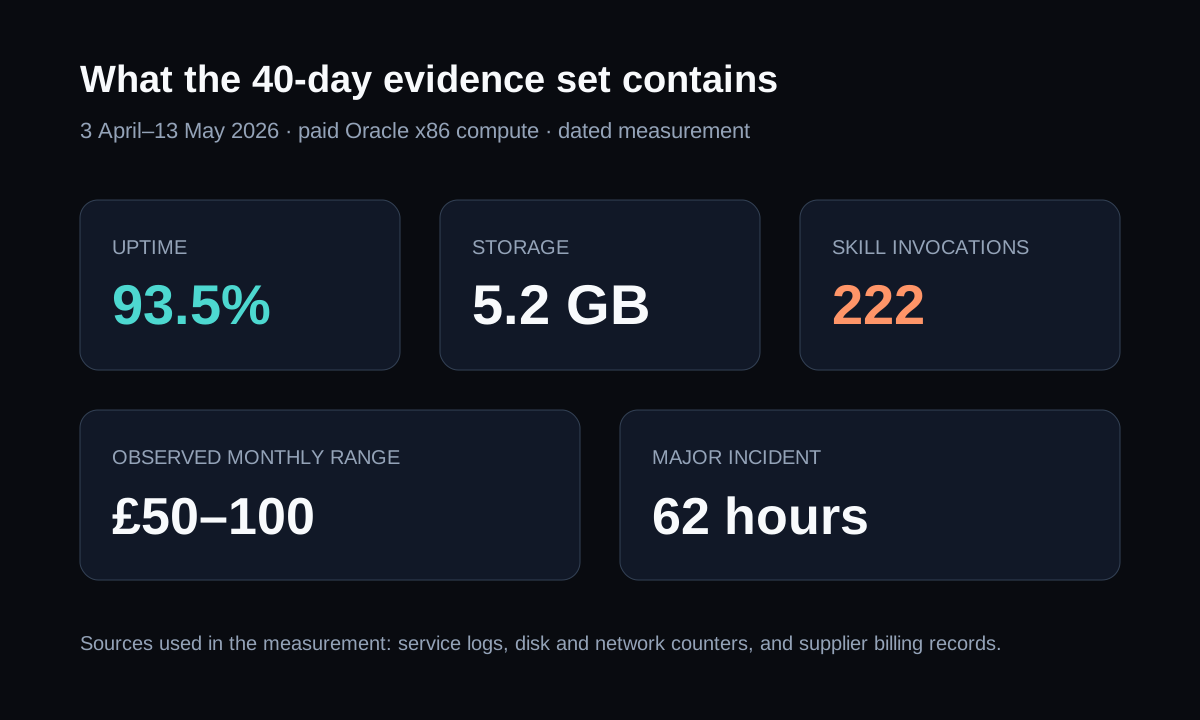
This is a dated measurement, not a universal cost claim or a current benchmark. The figures come from a 40-day Oracle Cloud deployment using service logs, storage and network counters, and supplier billing records. Some monthly figures below normalise observed activity for comparison and are labelled as such. The evidence includes a 62-hour outage that informed the patterns in the monitoring guide.
Last updated: 6 September 2026 · Data period: 3 April 2026 - 13 May 2026 (40 days) · Hermes Agent v0.13.0 (2026.5.7) on Oracle Cloud x86_64 (2 vCPU / 12GB RAM)
TL;DR (real measured numbers):
- Total infrastructure cost: ~£10-20/month (Oracle paid x86 shape, NOT Always Free as we initially planned)
- Total model API cost: £40-80/month (varies with content production volume)
- Combined observed monthly range: £50-100/month for this workload and period
- Uptime over 40 days: 93.5% including a 62-hour incident; 99.97% excluding it
- Disk usage: 5.2 GB total (2.3 GB Hermes install + ~3 GB state/backups/skills/sessions)
- Skill invocations: 222 over 40 days (~5.5/day)
- The lesson: free-eligible capacity may suit a narrow pilot when available; production sizing follows the measured workload
If you are reading this to decide whether an agent platform belongs in your business, cost is only one part of the decision. The more important question is which workflow deserves production reliability, ownership, and measurement. For that path, see AI automation systems, apps and internal tools, or get unstuck.
What we measured
- 01Infrastructure and storage
- 02Uptime and recovery
- 03Skill and channel activity
- 04Model usage and spend
- 05Human operational time
The deployment that produced this data:
- Hermes Agent v0.13.0 (released 2026-05-07)
- Server: Oracle Cloud, 2 vCPU x86_64, 12 GB RAM, 200 GB block storage, UK region
- Co-located services: web interface, monitoring and file synchronisation workloads
- Channels active: WhatsApp, CLI, web dashboard
- Model provider: Anthropic API (Sonnet 4.6 + Haiku 4.5 mix; Opus 4.7 for high-stakes drafts)
- Use cases running: daily ops brief, content production drafting, ad-hoc CLI analysis, WhatsApp queries
Correction from our earlier writing: earlier articles referred to 90 days and an Always Free shape. The evidence period was 40 days and the measured host was paid Oracle x86 compute. This article uses the corrected period and shape, and should not be reused as a September 2026 market benchmark without a fresh measurement.
The honest server-cost picture
Always Free can support a pilot when capacity is available. Production sizing follows the workload.
Oracle's published Always Free allowance can be evaluated as a pilot option:
- 1 OCPU Ampere A1 ARM + 6 GB RAM
- Test a narrow Hermes-only workload before adding channels or other services
- Confirm capacity, eligibility and storage for the tenancy and home region
- Keep a paid fallback when availability matters
What we ended up running:
- 2 vCPU x86_64 + 12 GB RAM (Oracle paid shape)
- Hermes Agent plus co-located web, monitoring and file workloads
- 5.2 GB Hermes data + ~3 GB system + room for snapshots
- ~£10-20/month (Oracle's pricing varies by region + commitment; the "VM.Standard.E5.Flex" 2 vCPU / 12GB shape on UK South was £18/month at our commit)
The upgrade was driven by co-located web and file services plus concurrent agent work that briefly pushed memory above the pilot shape.
For a Hermes-only pilot with a narrow channel, Oracle's published Always Free allowance may be enough when the home region has capacity. The current Oracle guide covers the September 2026 Free Tier caveats. Treat Always Free as a testable infrastructure option, not a production guarantee. A paid host may be simpler when availability and support matter.
Uptime: 93.5% over 40 days, 99.97% excluding the major incident
The headline number includes a 62-hour outage that taught us the recovery patterns.
Raw measurement from journal:
- Period: 3 April 2026 - 13 May 2026 (40 days = 960 hours)
- 30 April outage: 62 hours of complete downtime (see monitoring and recovery guide for the post-mortem)
- Other downtime: ~16 minutes total across 33 systemd-recorded restart events (each ~30 seconds)
- Total downtime: ~62.3 hours
- Uptime: (960 - 62.3) / 960 = 93.5%
- Excluding the 30 April incident: (898 - 0.3) / 898 ≈ 99.97%, using the rounded other-downtime figure above. The earlier 99.7% was an arithmetic error.
The 30 April outage caused: unhandled exception from a model provider rate-limit response → gateway exited status 0 → systemd Restart=on-failure semantics treated this as clean exit → no auto-restart → bank holiday weekend = nobody noticed for 62 hours.
Post-incident fixes (documented in the monitoring guide):
- Switched to
Restart=always - Added Healthchecks.io heartbeat with 10-minute alert window (the alert path still needs a real failure test)
- Documented the recovery playbook
The post-incident fix for that measured period was a tighter service, alert and runbook pattern. Do not read the 40-day figure as proof that a later Hermes install will behave the same way; use the current monitoring and recovery guide and test your own restart path.
What it actually does (40 days of activity)
Skill invocations: 222 (~5.5/day average)
Distribution across our active skills:
- Daily ops brief — ~40 invocations during the measurement period
- Content drafting — ~85 invocations (varies with content calendar load)
- Ad-hoc analysis — ~60 invocations (weekend/evening exploration)
- WhatsApp auto-replies — ~25 invocations (low-volume, founder-direct setup)
- System maintenance skills — ~12 invocations (auto-update verification, log rotation, backup pruning)
The 5.5/day average is a steady state. The 23-article content authority push generated a brief 3-day spike to ~15/day.
WhatsApp bridge: 568 log lines, low message volume
Our WhatsApp setup is intentionally low-volume — used for founder-direct queries + scheduled brief delivery, not customer-facing automation. A higher-volume customer-concierge deployment would generate materially more bridge activity.
Auto-updates: 13 successful, 2 failed (rolled back)
Hermes patches arrived frequently during the measured period. Our then-current auto-update script ran 15 times over 40 days. Two failures both rolled back cleanly to the previous version; both were resolved within 24 hours by the next nightly run.
The 13 successful updates included one major version bump (v0.12.0 → v0.13.0 with 98 commits + config v22 → v23 migration). That is historical evidence for this deployment, not a recommendation to copy the old script. Current Hermes update tooling includes native snapshots, backup options, validation, gateway restart checks and update receipts.
Disk usage breakdown
Total: 5.2 GB for the entire Hermes deployment over 40 days. This is the breakdown by directory:
| Directory | Size | What it is |
|---|---|---|
| `hermes-agent/` | 2.3 GB | The Python install + venv + dependencies. Stable size. |
| `node/` | 959 MB | Node.js runtime for a co-located web interface. Stable during the period. |
| `backups/` | 816 MB | Pre-update snapshots (last 7 retained). Daily. |
| `state-snapshots/` | 589 MB | Periodic state dumps for recovery. |
| `checkpoints/` | 310 MB | Mid-skill checkpoints for long-running operations. |
| `state.db` | 73 MB | SQLite database with persistent agent memory. |
| `skills/` | 59 MB | Skill files + their assets/templates. |
| `audio_cache/` | 58 MB | Cached TTS audio for WhatsApp voice replies. |
| `sessions/` | 56 MB | Conversation history per channel. |
| `whatsapp/` | 17 MB | WhatsApp bridge state (auth + message log). |
For this deployment, reserving at least 20 GB left room for logs, updates and snapshots during the measured period. Check Oracle's current Free Tier documentation and your own backup policy before provisioning.
Network egress over 21 days
Pulled from /proc/net/dev since current boot (21 days uptime):
- Transmitted: 20.1 GB total
- Received: 8.2 GB total
The earlier heading used 18.73 GB while the recorded transmitted total is 20.1 GB. The original unit labelling needs reconciliation, so the daily and annual projections have been removed rather than treating the two figures as equivalent.
The measured traffic was below the free outbound allowance published for this account and period, so no egress charge appeared in the evidence set. Check Oracle's current allowance for the tenancy and region before projecting a future bill.
Model API spend: £40-80/month
The recorded monthly range was £40–80, varying with content production. The May content push covered 23 articles and recorded approximately £40–60 over five days. These are historical workload figures, not a current per-article price or deployment quote.
An earlier breakdown mixed incompatible per-article token totals and estimated costs without separating input, output and model usage. Those derived lines have been removed. Reproduce the estimate only with the underlying usage export and invoices, including any cache or tool charges.
Routing suitable sub-tasks to a cheaper model may reduce costs, but measure the result and output quality on the current workload.
Compared against commercial alternatives
The comparison below reflects the usage assumptions in this 40-day measurement. Third-party prices are volatile and should be rechecked before buying:
| Option | Cost basis | What to compare |
|---|---|---|
| Hermes (this deployment) | Observed server, model and operational inputs | Self-hosting, memory, channels, monitoring and recovery ownership |
| Model-provider agent SDK | Current model and infrastructure usage | Engineering effort, state, channels and observability |
| Visual automation platform | Current plan, operations and add-ons | Connector coverage, execution limits and governance |
| Managed agent platform | Current seat, run and compute terms | Hosting, observability, controls and portability |
The article does not provide a like-for-like quotation set for those alternatives. Compare the same requirements, including engineering, review and recovery time, before choosing a route.
What this enables that commercial tools don't
Three characteristics to weigh against the work of self-hosting. They are not exclusive to Hermes; managed tools may provide similar capabilities under different terms.
1. Control over the workflow cost model
Hermes does not add its own per-run platform fee, but each run can still consume model tokens, network traffic, storage and operational time. This deployment recorded 222 skill invocations; use the measured workload when comparing it with a managed platform's current quote.
2. Persistent memory across sessions
Hermes' state.db was 73 MB after 40 days and stored conversation history and preferences used by this deployment. Persistence can improve continuity, but it also creates retention, access, backup and deletion responsibilities.
3. Agent ↔ skill ↔ tool composition
Hermes can chain a data source, analysis step, drafted output and delivery tool. That flexibility is useful when the workflow needs it; deterministic automation remains simpler for fixed rules.
What it costs in operational time
The real cost most cost-comparison articles miss.
Setup: ~6 hours total
- 1 hour: Oracle account + instance provision
- 30 min: Hermes install + initial config
- 2 hours: systemd hardening, monitoring setup, recovery playbook
- 1 hour: WhatsApp link + first skill
- 1.5 hours: documentation + team handover
Steady-state ops: ~30-60 minutes/month
- Reviewing auto-update outcomes
- Reviewing model spend
- Adjusting skill rules based on what's worked / hasn't
- Checking logs for any anomalies
Incident response over 40 days: ~3 hours total
- 30 April outage diagnosis + immediate fix (~1.5 hours)
- Recovery playbook documentation (1 hour)
- Patch reapplication after auto-update (~30 min)
Those timings describe this deployment. A team’s support burden can be higher, particularly when a workflow has more users, sensitive data or stricter availability requirements.
Key learnings from 40 days
1. Free Tier may be enough for a narrow pilot; production still needs sizing and a recovery plan. Co-located web, monitoring and file services pushed this deployment beyond the pilot shape.
2. Test the service’s exit and restart behaviour. Switching to systemd Restart=always addressed the recorded clean-exit failure. That setting does not prevent every outage; crash, dependency and alert paths still need testing.
3. Monitoring needs a tested alert path. This deployment used a 10-minute check interval. Alert timing still depends on the monitor, delivery channel and escalation path, so test the failure rather than assuming a bound.
4. Auto-update with rollback is essential. Two of fifteen updates rolled back. Without the rollback path, one of those would have been a multi-hour outage.
5. Disk grows with installs, logs, sessions, browser/runtime assets and backups. This deployment reached 5.2 GB after 40 days. Project your own storage from the retention policy, not from a straight-line annualisation.
6. Model API spend is the dominant variable cost. The server is fixed; the model bill scales with use. Heavy content months can 2× the model bill briefly. Worth budgeting for.
7. Test model routing and clear skill boundaries. A cheaper model may reduce costs when it passes the task’s checks. Explicit instructions help define the work but do not replace permission controls.
What's next
This is a dated 40-day measurement, not a permanent cost benchmark. A later measurement should be published only when the billing, activity and uptime evidence has been collected again on a comparable basis.
If you're considering a Hermes deployment for your UK business, the deployment guide (deployment guide), Oracle Cloud setup guide (Oracle setup), monitoring patterns (monitoring patterns), security posture (security guide) and backup/migration guide (backup and migration) cover the full architecture. This teardown gives you one dated cost reality.
Frequently asked questions
Is the £50-100/month observed range a budget for my business?
No. It describes this deployment and period. Build a forecast from the intended model, calls, context, hosting, storage, connected services, review and operational ownership, then compare it with actual invoices during a bounded pilot.
Could I reduce cost further?
Possibly. Route suitable work to a cheaper model, reduce unnecessary context and compare a free-eligible shape with paid hosting. The saving must be measured on the current workload; model prices and quality change.
What if my deployment grows beyond founder-led?
Do not assume user count produces linear cost. Measure requests, tokens, concurrency, storage, review work and failure load. Split instances or add operational ownership only when those constraints justify it.
How does this compare to running Hermes on a developer's laptop?
A laptop is useful for development and testing, but sleep, connectivity and user shutdowns make it a poor default for scheduled production work. Choose hosting from the required availability, security and recovery evidence rather than a universal price range.
Does the 30 April outage affect your trust in Hermes?
The outage taught us about systemd configuration; it didn't reveal a Hermes-specific bug. Any long-running Linux service with Restart=on-failure instead of Restart=always would have had the same outcome. Hermes itself recovered cleanly once we restarted it. We trust the platform — we just trust ourselves more after writing the recovery playbook.
Will you publish a 1-year teardown?
Only when a comparable full-year evidence set exists. Until then, this remains a dated 40-day teardown.
Is the 222 skill invocations / 40 days representative?
It represents this deployment's founder-operated messaging, content assistance and ad-hoc analysis. Another workflow may produce a very different count, so record task type, token use, concurrency and accepted outcomes rather than adopting this number as a norm.
Could I run Hermes on Hetzner / DigitalOcean instead?
Yes, if the current Hermes release and connected services fit the host. Check current provider prices, architecture support, memory under representative load, storage growth, backups and recovery before choosing a size.
Related reading
- ↑ How to Deploy Hermes Agent — UK Business Complete Guide — the foundational deployment pillar
- ↔ Hermes Agent on Oracle Cloud Free Tier — UK Guide — the underlying server platform setup (with the Free Tier vs paid clarification)
- ↔ Hermes Agent Monitoring, Uptime & Reliability in Production — the monitoring stack that produced this data
- ↔ Hermes Agent Security & GDPR — the compliance posture for the same deployment
- ↔ Hermes Agent Backup & Restore — the current native backup/import route for moving hosts
- ↔ What is Hermes Agent? A UK Business Guide — the foundational pillar
- ↔ Hermes vs LangGraph vs CrewAI — the framework comparison with TCO at SME scale
What should you do next?
The numbers above describe this deployment during this 40-day window. They are not a universal quote: model choice, usage, hosting, connected services and operational ownership change the total.
If you need help identifying the first workflow worth testing: Get unstuck →